Pages

Saterdag 27 April 2013

Compare Canon Powershot G15 vs G12 vs G1 X

Compared to Canon Powershot G15 vs G12 and G1 X


In this time, we give you an overview of the design and operational differences between the Canon Powershot G15, its predecessor the G12, and both cameras' large sensor cousin, the G1 X.

Camera body comparison

When seeing the G15, G12 and G1 X side-by-side, at first it's hard to tell the three cameras apart. They share almost identical styling and ergonomics, and their dimensions are pretty close as well. However, upon closer examination the differences become quite obvious. The G15 is the smallest and lightest of the three, which makes it the best option if pocketability is far up your list of priorities. As you can see from the top-town view, the G15 is considerably slimmer than either the G12 and G1X.

The difference in dimensions compared to the G12 is largely caused by the lack of the swivel LCD, which makes the G15 about 17% slimmer. This margin is by no means massive, but it makes a difference when handling the camera and storing it in a coat pocket. The G1 X of course is a totally different kettle of fish. Although it closely follows the G-series design ethos, its much larger sensor (vs the G15 and G12's 1/1.7" sensor, see diagram at the bottom of this page) requires a much larger lens which protrudes from the body even with the camera switched off. This is also the reason why the G1 X is approximately 180 grams heavier than the G15, at 534 grams.

Despite small differences in design and dimensions, all three cameras look very similar from the front. The main difference on the G12 is the built-in flash on the top right, which has been swapped for a pop-up variant on the G15 and G1 X. Meanwhile the G1 X lacks an integrated lens cover, and needs a separate cap instead.

The button layout on the rear is essentially identical on all three cameras, but while the button in the top right corner of the G12 locks the exposure, this has been converted into a dedicated movie button on the G1 X and G15. The other element on the camera back that separates the three cameras is of course the LCD screen. The G12 comes with a 2.7" screen, while the larger G1 X finds space for a 3" variant. The G15 has done away with the swivel screen and sports a 3" fixed variant, resulting in a thinner camera profile.

The top-down view illustrates the different depths of the three Canon G-series models, but also shows the evolution in terms of control layout. The oldest model, the G12, sports an exposure compensation dial to the left of the flash hotshoe, and a stacked ISO/mode dial combination on the right. On the G1 X the number of dials has been reduced to two - to make space for the pop-up flash but presumably also because the expanded ISO range makes the use of a physical dial less feasible. The exposure compensation dial has taken over its location.

The G15's dial layout is almost identical to the G1 X, but the mode and exposure compensation dials have been slightly offset, making the latter more easily controllable with your thumb without altering your grip on the camera.

Key specification comparison

The table below compares the G15's key specification against its predecessor G12 and Canon's large-sensor compact, the G1 X. Compared to the G12 the G15 has a sensor with a slightly higher pixel count, sports the newer Digic 5 imaging processor, a faster lens, higher resolution screen, expanded ISO range (on the G12 ISO 6400 and ISO 12800 are only available in a very limited high sensitivity mode), faster continuous shooting and higher resolution video recording.


Canon Powershot G15
Canon Powershot G12
Canon G1 X
Sensor 12.1 megapixels
1/1.7" (7.44 x 5.58 mm)
CMOS
10.0 megapixels
1/1.7" (7.44 x 5.58 mm)
CCD
14.3 megapixels
1.5" (18.7 x 14 mm)
CMOS
Processor Digic 5 Digic 4 Digic 5
ISO 80-12800 80-3200 100-12800
Lens 28 – 140mm equiv
F1.8-2.8
28 – 140mm equiv
F2.8 - F4.5
28 – 112mm equiv
F2.8 - F5.8
LCD Fixed
3"
922,000
Articulated
2.8"
461,000
Articulated
3"
920,000
Con drive 2.1 fps 1.1 fps 1.9 fps
Video 1920 x 1080 (24 fps) 1280 x 720 (24 fps) 1920 x 1080 (24 fps)
Dimensions 107 x 76 x 40 mm
(4.21 x 2.99 x 1.57")
112 x 76 x 48 mm
(4.41 x 2.99 x 1.89")
117 x 81 x 65 mm
(4.61 x 3.19 x 2.56")
Weight
(inc. batteries)
352 g
(0.78 lb / 12.42 oz)
401 g
(0.88 lb / 14.14 oz)
534 g
(1.18 lb / 18.84 oz)

The G1 X's specification reads more similarly to the G15's, but the camera is larger and heavier due to its larger sensor (see diagram below). It also means that the image quality, especially at higher sensitivities, is considerably better than the G15, with more image detail and less noise. That said, the G15's faster lens means that you can select a lower ISO setting to achieve a certain shutter speed in a given light situation, reducing this particular advantage of the G1 X's larger sensor. The diagram below shows the size of the G15 and G12's sensor (1/1.7") in comparison to the G1 X's and other popular sensor formats.

The Canon Powershot G15's 1/1.7" sensor is slightly larger than the 1/2.3" sensors found in most compact cameras, but significantly smaller than the 1" sensor that can be found in the Nikon 1 system cameras and the Sony RX100, or the 1.5" sensor of the G1 X.

Vrydag 26 April 2013

Fujifilm X20 Review

At first glance, the X20 looks just like its predecessor the X10, although it's now available in a very pretty silver-and-black finish, alongside the conventional all-black. But inside it offers a couple of very significant differences. The first is a brand-new sensor, a 2/3" type 'X-Trans CMOS' design that uses the same novel colour filter array as Fujifilm's recent APS-C cameras. Second is an updated 'Advanced Optical Viewfinder' that includes a detailed information overlay, showing key exposure data and compositional gridlines. This isn't the same as the hybrid viewfinder found in the company's X100/X100S and X-Pro1 models - there's no electronic viewfinder - but it's never been done before on a digital zoom compact.


Aside from this, the X20 retains most of the same features that made the X10 an extremely appealing little camera. It uses the same fast zoom lens, with a 28-112mm equivalent angle of view and F2-2.8 maximum aperture, which is operated by a mechanically-coupled zoom ring that also retracts the lens and turns the camera off. It has plenty of external controls, including an exposure compensation dial and two rear dials, and a hot shoe for external flash. One feature notable by its absence is a direct movie record button - this is a camera primarily designed for stills photography.
Fujifilm X20 key features

  •     12MP 2/3"-type X-Trans CMOS sensor
  •     On-chip phase detection autofocus
  •     EXR Processor II
  •     'Advanced Optical Viewfinder' with exposure information overlay
  •     28-112mm equivalent, F2.0-2.8 lens with optical image stabilization
  •     Manual zoom ring and lens retraction mechanism
  •     Full manual control, RAW format recording
  •     3" 460k dot LCD
  •     Full HD 1080/60fps movie recording (36Mbps bitrate)
  •     Built-in stereo microphones, optional MIC-ST1 external microphone
  •     Film simulation modes for different colour and monochrome 'looks'
  •     In-camera RAW conversion with all processing parameters adjustable
  •     'Advanced Filters' image-processing controls, previewed live on-screen
  •     Focus peaking display for manual focus using the rear LCD
  •     Lens Modulation Optimiser for compensation of aberrations

   
Fujifilm X-Trans CMOS sensor

The X20 uses an all-new sensor, which like the X10's is of the 2/3" type (~8.8 x 6.6mm), and therefore larger than those used in most of its competitors (see diagram below). But instead of its predecessor's EXR design, it gets Fujifilm's latest 'X-Trans' colour filter array, as used in the company's X-Pro1 and X-E1 mirrorless models and the X100S fixed-lens APS-C compact. This doesn't use an optical low-pass filter, and according to Fujifilm should give higher resolution than conventional Bayer-type 12MP sensors. The sensor is also of the 'backside illuminated' type, which places the photodetectors on the opposite side of the chip from their associated circuitry. This promises better light-gathering capability, which should mean improved noise performance.

The second addition to the sensor design is an on-chip phase detection system for faster autofocus. Indeed Fujifilm is promising AF speeds faster than 0.2 sec under all conditions, a significant improvement over the X10. If this is realised in practice it'll make the X20 one of the fastest compacts around. The portents are good too, as the F300EXR which previously used this technology was very quick indeed, and the BSI design means the phase detection pixels gather as much light as possible.

The switch to the X-Trans CMOS sensor addresses one of the X10's most obvious weaknesses - it simply can't resolve quite as much detail as its competitors with conventional sensors. But it also loses one of its strengths, the excellent 6MP 'DR' shooting mode that offers vastly better highlight rendition than other compact cameras in difficult lighting conditions. However the X20 will still offer more-conventional DR expansion settings at 12MP resolution, which should help make up for this.
Sensor sizes compared

The diagram below compares the size of the X20's 2/3" sensor to those in its nearest competitors - in general larger sensors potentially offer better image quality. The X20's sensor is half the size of that found in the (more expensive) Sony RX100, but it's about half as large again as the Canon G15's.

Body & Design

The X20 uses exactly the same basic body design as the X10, with all the same buttons and dials in all the same places. Indeed there's barely a space on the camera aside from the handgrip that doesn't have a control of some sort. Its standout feature is its mechanically-coupled zoom ring, as opposed to the electrically operated zooms found in all its competitors. This offers a directness of compositional control than many photographers really appreciate (although it's not quite so great if you like to zoom the lens during movie recording).

Look a little more closely and there are a few detail changes compared to the X10, mainly to take advantage of the optical viewfinder's increased utility. So there's an eye sensor beside the finder window for automatic switching with the rear LCD. The drive mode and AF area selection buttons have also swapped places, so that the latter is readily accessible with the camera to your eye. This offers the ability to move the focus area around the frame when shooting with the optical viewfinder, something that's unique for a zoom compact.

Aside from that, the button on the bottom right of the camera is now labelled 'Q' rather than RAW, as its main function is now to bring up the on-screen Q-menu for quick settings changes. The camera's model badge is also now on the front plate below the popup flash (the X10 wore its name on the top plate). One point worth noting is that the X20's fast lens and large-diameter front element means there's no built-in lens cover - instead it requires a push-on cap.

Viewfinder
While the vast majority of zoom compact cameras have now lost the optical viewfinder entirely (with the honourable exception of the Canon Powershot G15 and G1 X), Fujifilm has decided it's still useful. The X10's was already unusually large, but the X20 adds something many people assumed must be impossible - an information overlay that can include not only key shooting data (shutter speed, aperture, exposure compensation, and ISO), but also gridlines and a display of the active focus area.

While this idea has been extremely well-received in the X100 and X-Pro1, its important to understand that the X20 isn't quite the same. There's no space for a fully electronic eye-level viewfinder, and the shooting information is provided by a 'Digital Trans Panel' display that's placed within the viewfinder's optical path. The available information is more limited, and most notably there's no live histogram display. The optical viewfinder only offers 85% coverage of the lens's field of view, so you'll get a bit more in the final image than you saw while shooting. As on the X10, the bottom right corner of the frame is also partially blocked by the lens barrel at zoom settings wider than 35mm (equivalent).

The diagrams below, kindly provided by Fujifilm, give an idea of how the X20's viewfinder information will look.
The X20's mechanical zoom ring doubles as the power switch, retracting the lens in the 'OFF' position as shown here. But this does mean that the X20 is relatively bulky to carry around compared its rivals which retract the lens right into the body.
The X20 has built-in stereo microphones hidden behind small holes on the front. Below the right mic (i.e. on the left here) is a bright LED lamp to aid focusing in dark conditions. The AF illuminator can be turned off if you prefer. It can also be disabled, along with the flash and camera sounds, by pressing down the 'DISP' button for 2 seconds to enter 'Silent' mode.
A three-position rotary switch on the front of the camera selects the focus mode. There's a choice of single-shot AF, continuous AF, and manual focus.
The upper rear dial is perfectly placed for operation by your right thumb. It can be clicked in to change its function in certain modes - for instance to switch between changing the shutter speed and aperture in manual exposure. Underneath is an autoexposure/ autofocus lock button, that can be customised to suit your preferences.
Below this is a second control dial that surrounds the 4-way controller and Menu/OK button. The buttons of the 4-way controller have dedicated functions in shooting mode - on the X20 the 'up' key is used to enter AF area selection mode.
The tiny little flash unit pops-up out of the top plate. It's not motorized, so won't activate automatically when the camera is in auto modes. Instead you have to release it using a sliding switch beside the viewfinder eyepiece.
There's a hotshoe on the top plate that has contacts for use with Fujifilm's dedicated external units. These range from the compact EF-20TTL to the large, powerful and fully-featured EF-42TTL.
The X20's connectors lie under a small flap on the handgrip side of the camera. There's an HDMI port for playing back video, and above it a tiny USB/AV out socket.
The tripod socket is placed off-centre from the lens, as is common with zoom compacts. It's well-separated from the base compartment, meaning you have a fighting chance of being able to change the battery or card with the camera on a tripod. The camera's small built-in speaker for movie playback can also be seen here, next to the base compartment door.


First impressions


Fujifilm has been on something of a roll since the announcement of the X100 a couple of years ago, and the X20 shows that it's not content to rest on its laurels just yet. We rather liked the X10, especially its fast lens with manual zoom ring and extensive external controls, and the X20 builds on this design while adding some compelling-sounding new features. The switch to a 12MP X-Trans CMOS sensor promises more-detailed images, and the addition of on-chip phase detection AF should provide a welcome boost in speed. For photographers who still enjoy using an optical viewfinder, the addition of an information overlay panel may well look like a dream come true.

In the increasingly-competitive enthusiast compact sector, the X20 looks like it could be a standout camera for 'traditionalist' photographers who'll appreciate its manual zoom and optical viewfinder. But it's up against some extremely good cameras, such as Canon's Powershot G15 which is distinctly more svelte and offers a longer zoom, or the Olympus XZ-2 with its tilting rear screen and optional electronic viewfinder. But there's every reason to believe the X20 will be able to hold its own in such exalted company, and we're very much looking forward to getting our hands on a reviewable camera to find out.

Canon EOS 60D Full Review

The long-awaited Canon EOS 60D comes with some incremental upgrades, a few unexpected losses, and some nice surprises; what was not a surprise was its easy and straightforward operation for one already familiar with cameras in this prosumer line, and excellent image quality across the ISO range.

The design of the Canon 60D is slightly smaller, and more specifically aimed at the advanced amateur market, better fitting into the niche occupied by the Nikon D90 and now the D7000, while the Canon 7D remains a better match for the Nikon D300S, as both are cameras aimed more toward those making money with their photographs. The redesign still mostly adds and improves features, like the 18-megapixel sensor, Full HD Movie mode, and Vari-angle LCD, but there's at least one feature deletion that is a little frustrating, which we'll get to shortly.

As mentioned in the overview, the Canon 60D has a few more consumer-friendly features to go along with its consumer-friendly design. In addition to the Scene modes that have always accompanied this level of SLR, Canon now includes many image and video editing features right in the camera. Much of what was introduced in the 7D, including the color-detecting metering system and leveling features, made it into the Canon 60D, but along with those changes came a simplification of controls and a downsizing of the camera body. The one feature unique to the EOS 60D among Canon's SLRs is the Vari-angle LCD, brought over from the PowerShot line.

Look and feel

Anyone who thought the 50D was a little too bulky will appreciate the Canon 60D's smaller size and reduced weight. Body-only weight including battery and card has decreased by 1.5 ounces (43g) to 27.5 ounces (1.72 pounds, 779g), despite the swivel screen. The body is made of a mixture of ABS resin, polycarbonate resin, and polycarbonate resin with a special conductive fiber, presumably for EMI (electromagnetic interference) shielding. The frame is aluminum and polycarbonate enhanced with glass fiber. Dimensions are 5.7 x 4.2 x 3.1 inches (145 x 106 x 79mm), a little bit shorter and less wide than the 50D, and just a bit thicker overall from the lens mount to the LCD thanks largely to the swiveling LCD.

Canon did not detail just how many environmental seals that the EOS 60D has, but they did say that it is a "robust, densely packed compact body with dust and water resistance." As you can see in the two diagrams at right, the EOS 60D's sealing is fairly extensive.

The Canon 60D's grip is smaller, with a nice indentation just inside the grip to help improve your hold, something we've long appreciated in Nikon SLR designs. It's less noticeable from the front, but there's still an indentation for the middle finger to quickly align your hold.

Also in that indentation you'll find the infrared remote control window, something that's long been absent on the 60D's predecessors, yet included on the digital Rebels. Indeed, the omission dates all the way back to the original Canon consumer digital SLR, the D30, introduced in 2000.

Upper right of the lens mount are four holes for the new mono microphone. A stereo microphone jack is also built into the Canon EOS 60D for better quality movie recording.

From the top you see the nice EF-S 18-135mm f/3.5-5.6 IS lens, equivalent to a 28.8-216mm lens on a full-frame 35mm camera. Note that the lens is not USM (ultrasonic motor) drive, so it makes a little noise while focusing, unlike the 28-135mm lens that was bundled with the 50D. The Mode dial on the left shoulder is a little different. First it omits the longstanding A-DEP setting that most people probably didn't use (it allows you to set your desired depth of field using AF points), and second, there's a button in the middle that you use to unlock the Mode dial. This is not new to EOS, but it is new to their digital SLRs (my old EOS Elan had a locking Mode dial). Many will love it, many will hate it. It's easy enough to learn once you're used to your camera, and prevents you from accidentally changing the exposure mode.


Differences on the right side start with the tapered LCD screen. Users of the 7D may also notice that the four buttons across the top of the LCD have only one function, not two. In fact, it gets even more straightforward: the settings that each button adjusts appears beneath it on the LCD. No more looking all over the LCD to find the setting you want to change, and no more guessing which dial to use to change it; both will work. That is new, and makes good sense.

Canon 60D Technical details


Sensor
The Canon 60D's 18.0-megapixel, APS-C sized CMOS image sensor raises the resolution slightly from the Canon 50D's 15.1 megapixels, accompanied by a decrease in photodiode pitch from 4.7µm to 4.3µm. With dimensions of 22.3 x 14.9mm, the overall sensor size is unchanged, yielding the same 1.6x focal length crop. The new sensor also retains a four-channel readout design, like that of its predecessor.

The maximum image dimensions for both JPEG and Raw still image shooting are 5,184 x 3,456 pixels. For Raw shooting, two reduced resolution options are available -- mRaw (3,888 x 2,592 pixels), and sRaw (2,592 x 1,728 pixels). JPEG shooters have four reduced resolution options -- 3,456 x 2,304 pixels, 2,592 x 1,728 pixels, 1,920 x 1,280 pixels, and 720 x 480 pixels.

Processor
Canon has retained their DIGIC 4 image processor in the EOS 60D. With increased resolution, but the same image processor and sensor readout design, something had to give. The Canon 60D's burst shooting speed hence falls to 5.3 frames per second, down from 6.3 frames per second in the 50D. Maximum burst depth is essentially unchanged, however, at 16 Raw images, or 58 large / fine JPEG images.

Sensitivity


Despite the increased resolution, and the corresponding decrease in photosite size, the Canon EOS 60D has an ISO sensitivity range of ISO 100 to 6,400 equivalents in 1/3 EV increments, with the ability to extend to ISO 12,800 equivalent. While the expanded range is unchanged from that of the Canon EOS 50D, the ISO 6,400 position has been moved inside the standard range, rather than being provided as an expanded setting. This is an indication of Canon's confidence in the 60D's noise performance. The Canon 60D also offers an Auto ISO function, which operates within the standard ISO 100 to 6,400 range. Basic Zone operating modes limit sensitivity to ISO 3,200 equivalent.

Autofocus
The Canon 60D's AF sensor is unchanged from the 50D, and features a 9-point diamond array, with nine cross-type f/5.6 autofocus points, meaning that they're all sensitive to vertical or horizontal lines. Nestled in the center is an additional precision AF sensor that is arrayed diagonally and used when you mount a lens of f/2.8 or faster. It has the advantage of detecting horizontal, vertical, and diagonal lines. All nine AF points can be selected automatically or manually, and the autofocus sensor has a working range of -0.5 to 18 EV (at 23°C / ISO 100). The Canon 60D includes the ability to detect the light source (including the color temperature and whether or not the light is pulsing), and then take these into account and microscopically shift the focus as necessary. Autofocus modes include One-shot, Predictive AI Servo AF, and AI Focus AF, which automatically selects between the One-shot and AI Servo modes.

Unlike the 50D and 7D, the Canon 60D lacks the Lens AF Microadjustment custom function, which allows you to tune the camera's autofocus to compensate for lenses that back or front-focus. Not all lenses are tuned just right, but this tool can help make a slightly soft lens a whole lot better. It's a shame of an omission.

Exposure

The Canon 60D provides a full complement of exposure modes, split into two distinct groups -- the Basic and Creative zones. The Basic zone comprises Full Auto, Flash Off, Creative Auto, Portrait, Landscape, Close-up (Macro), Sports, and Night Portrait modes. The Creative zone includes Program, Shutter-priority, Aperture-priority, Manual, and Bulb. There are also a Camera User setting, for registering settings for quick recall, and a Movie mode.

Metering
The Canon 60D inherits Canon's latest metering system, previously seen in the EOS 7D and Rebel T2i. Where the 50D used a 35-zone metering sensor, the Canon 60D now includes a 63-zone iFCL sensor, which stands for Intelligent Focus, Color, and Luminance metering. The name hints at how the sensor works: the iFCL chip has a dual-layer design with each layer sensitive to different wavelengths of light, allowing subject color to be taken into account when determining exposure. Information on focusing points is also taken into account in metering calculations. In this area, the Canon 60D's iFCL chip differs from that of the EOS 7D, taking account of the 60D's nine-point AF, as distinct from the 19-point system in the 7D.

The Canon 60D's exposure metering options include 63-zone Evaluative, Center-weighted Average, Partial (6.5% of image frame at center), and Spot (2.8% of image frame) options. Metering sensitivity range is specified at 0 to 20 EV (at 23°C/73°F, with EF 50mm f/1.4 USM lens, ISO 100). One notable change is that the Canon 60D now offers a wider exposure compensation range of +/- 5 stops, versus the +/- 3 stop range of the 50D. Granularity can still be adjusted, with a choice of either 1/3 or 1/2 EV steps. The Canon 60D also offers automatic exposure bracketing, within a range of +/- 2 stops, with the same step size choices.

Shutter
Like the 50D, the Canon 60D offers shutter speeds ranging from 1/8,000 to 30 seconds, plus a bulb position. Maximum flash x-sync is at 1/250 second. The Canon 60D's electronically controlled, vertical-travel, mechanical focal-plane shutter still has a rated life of 100,000 cycles.

White balance

The Canon 60D offers a full range of White Balance settings, including six presets, an Auto setting (3,000 to 7,000K), a Custom setting, and the ability to directly select a Kelvin color temperature. The six presets include Daylight (5,200K), Shade (7,000K), Cloudy (6,000K), Tungsten (3,200K), White fluorescent (4,000K), and Flash. The Custom setting (2,000 to 10,000K) bases color balance on a previous exposure, meaning you can snap an image of a white card and then base the color temperature on that image. The Kelvin setting allows direct entry of a color temperature between 2,500 and 10,000K in 100K increments.

A White Balance bracketing option snaps only one image, then writes three successive files from that single image. Bracketing steps are from -/+ 3 stops in whole-step increments. (Each stop corresponds to five mireds of a color conversion filter, for a total range of +/- 15 mireds. This corresponds to about a +/- 500K shift at a normal daylight color temperature of 5,500K.) There's also a White Balance Shift function, which lets you bias the color balance on green / magenta and blue / amber axes, within a +/-9 stop range in full-stop increments.

Flash


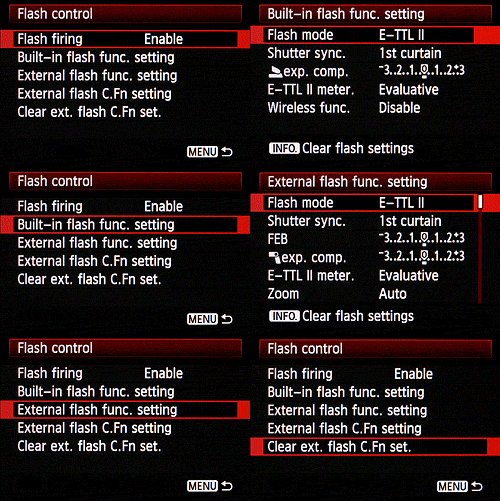
The Canon 60D includes a built-in popup flash, and a hot shoe for external flash strobes, but lacks the PC Sync terminal offered by the 50D and its predecessors. Maximum flash X-sync is 1/250 second. The Canon 60D's popup flash has a guide number rating of 43 feet (13 meters) at ISO 100, translating to a range of about 15 feet at ISO 100 with an f/2.8 lens. (Reasonably powerful, but not dramatically so.) The Canon 60D gives you a great deal of control over flash exposure, allowing you to adjust flash and ambient exposure independently of each other. Flash exposure compensation is possible within a +/- 3 EV range, in one-half or one-third EV increments. This makes it very easy to balance flash and ambient lighting for more natural-looking pictures.

When attached via the hot shoe, three specific Canon external flash strobes -- the Speedlite 270EX, 430EX II, and 580EX II -- can be configured directly from the 60D's own rear LCD display. In addition to its hot shoe, the Canon 60D's flash can also serve as a built-in Speedlite transmitter, allowing it to control one or more compatible Canon strobes wirelessly. The Canon 60D uses E-TTL II flash metering for both the built-in and compatible external flashes, which include the more recent Canon EX-series strobes.

Viewfinder

The Canon 60D features an eye-level pentaprism viewfinder similar to that of the 50D, but with slightly improved 96% coverage (our tests show it to be a little better than 96%). By way of comparison, the Canon 7D has 100% coverage, and the 50D has 95% coverage. The viewfinder magnification is unchanged from the 50D, at 0.95x (-1m-1 with 50mm lens at infinity), equating to a 27 degree field of view. Also unchanged is the eyepoint: 22mm from the center of the eyepiece lens.

Just like the 50D, the Canon 60D provides a diopter adjustment range of -3.0 to +1.0m-1. It also retains the its predecessor's ability to exchange focusing screens, and comes bundled with the same Ef-A Precision-matte focusing screen by default.

LCD

Probably the most notable change on the exterior of the Canon 60D is its Vari-Angle LCD display, appearing for the first time in an EOS-series camera. The tilt mechanism allows the LCD to be folded out 90 degrees to the left of the 60D's body, while the 270-degree swivel mechanism allows the screen to be turned 180 degrees to face upward or forward, or 90 degrees in the opposite direction to face directly downward. This also allows the LCD to be stowed facing inward, offering a modicum of protection against light bumps, scratches, and fingerprints.

The Canon 60D's screen comprises a three-inch Clear View TFT LCD panel -- the same diagonal size as the 50D's display, but with a wider 3:2 aspect ratio that matches that of the imager, rather than the 4:3 aspect ratio panel of the 50D. The change of aspect ratio also brings an increase in dot count from 920k to 1,040k dots, which roughly equates to a 720 x 480 pixel array. The Canon 60D's panel has 100% coverage, and includes a scratch-resistant fluorine coating. Display brightness is adjustable in seven steps.

Live View


The Canon 60D retains the Live View functionality from the 50D largely unchanged. The live view stream can be displayed either on the camera's 3.0-inch LCD panel, or on a tethered Windows or Macintosh computer using Canon's EOS Utility software. Three focus modes are offered in Live View mode, each providing advantages and disadvantages. In Quick mode, the Canon 60D drops the mirror back down to use the phase-detect autofocus sensors for focusing, potentially offering faster autofocusing operation, but with an interruption to the live view feed, and more noise from the mirror mechanism. In Live mode, the Canon 60D instead uses contrast-detect autofocus on data from the image sensor. The autofocus operation itself is slower, but there's no delay to lower and raise the mirror, nor any noise from mirror operation, and the Live View mode remains uninterrupted. Since the AF operation is performed using sensor data, contrast detection can provide more accurate focusing if there's sufficient contrast in the subject, and the focus point can be moved anywhere within the image frame, except for the extreme edges. Finally, Live Face Detection mode operates identically to Live mode, except that it adds the ability to detect faces in the image frame, and automatically sets focus on the dominant (or user selected) face.

The Canon 60D Live View mode also allows manual focusing, and provides a focus-assist zoom function that allows a portion of the scene to be viewed at either 5x or 10x magnification, making it much easier to perform fine manual focusing adjustments. The live view stream has a 30 frames-per-second refresh rate, and it is possible to overlay grids on the display to help with precise framing. Two silent shooting modes are available that reduce noise from the camera's shutter mechanism. In Silent Shooting mode 1, the 60D uses an electronic first curtain shutter, removing the need to close and reopen the mechanical shutter between Live View terminating, and the image exposure starting. It also reduces noise further by slowing recocking of the mechanical shutter's second curtain after exposure. Silent Shooting mode 2 does the same, but also delays the slowed recocking of the second curtain until the shutter button is released, allowing the photographer to select an appropriate moment when the noise will cause least disturbance.

Movie
Brand new to the Canon 60D is its movie recording capability, fast becoming a common function even among entry-level DSLRs, and at this point an absolute must-have feature for an enthusiast camera. The Canon 60D's video functionality is largely similar to that of the consumer-grade Rebel T2i model, but with the addition of the audio levels control functionality that's available in the 5D Mark II v2.0.4 update, and the wind cut filter function from the 7D.

Canon has provided three choices for movie resolution, all recorded as progressive scan video using H.264 compression. For High Definition fans, there's a 1,920 x 1,080 pixel mode -- commonly known as Full HD or 1080p -- saved at either 30, 25, or 24 frames per second. There's also a 1,280 x 720 pixel (720p) mode recorded at either 60 or 50 frames per second. Finally, there's a standard-definition 640 x 480 pixel (VGA) mode which is also recorded at either 60 or 50 frames per second.

The Canon 60D also offers the company's VGA crop function, as seen in the Rebel T2i, which works by simply cropping and recording the centermost 640 x 480 pixels from the sensor. This yields an effective 7x fixed zoom without interpolating the video. Of course, simply cropping the center of the image means that everything (including image noise) will be recorded at 1:1, so video has noticeably higher quality with the crop disabled. Still, for consumers who may well not be able to afford expensive telephoto lenses and only need standard-def output, it's an interesting feature.

For sound capture, the Canon 60D includes both an internal, monaural microphone, and an external 3.5mm stereo microphone jack, and movie audio is captured as 16-bit, 48KHz linear PCM. The audio levels function mentioned previously provides 64-step control of audio gain, although the 60D can also be set to control levels automatically if desired. The wind-cut filter function acts similarly to that from the EOS 7D, but can optionally be disabled. When active, it reduces recording levels below 100 hertz.

In Movie mode, the Canon 60D provides both Program auto and Manual exposure control, but not Aperture- or Shutter-priority. When using Manual exposure, 60D videographers can set the shutter speed, aperture, and ISO sensitivity (optionally -- Auto ISO is available) before recording starts, but these variables can't be changed during video capture. Canon's Highlight Tone Priority function is available when using Manual exposure. For Program exposure, metering is locked to Center-weighted unless Face Detection is enabled, in which case Evaluative metering is used. In either case, +/-3.0 EV of exposure compensation is available in 1/3 or 1/2 EV steps, and it's also possible to use the autoexposure lock function to prevent the exposure level changing during recording. Available shutter speeds for movie recording range from 1/4,000 to 1/30 second, if recording at 30, 25, or 24 frames per second, and from 1/4,000 to 1/60 second if recording at 50 or 60 frames per second. Movie sensitivities range from ISO 100 to 6,400 equivalents. The same White Balance and Picture Style settings as in still image recording are also applicable for video capture.

Electronic level
The Canon 60D provides a dual-axis electronic level function, reminiscent of that previously seen in the EOS 7D. The 60D's electronic level is shown on the rear-panel LCD display when in the correct display mode, both for live view and regular shooting. The level gauge can also be shown both on the top-panel status LCD display, and the small info display in the optical viewfinder, by pressing the Set button, if configured to do so. The electronic level display functions in one-degree increments.

Copyright info

As first seen in the Canon 7D, you can input copyright information right on the Canon 60D, as well as delete it at will. Captured images are tagged with the copyright information in the EXIF header, and is accessible in many Windows and Macintosh image editors, although it's easy to change or remove after the fact. The copyright information function is now available in models spanning all levels of Canon's digital SLR lineup, from entry level to professional.

Vignetting correction
The Canon 60D retains the Lens Peripheral Illumination Correction function that debuted in the 50D. Also known as vignetting correction, this function automatically reduces the severity of lens vignetting, which is visible as shading in the corners of an image. The function can be disabled, and works by default with a subset of Canon's most common EF-mount lenses. Data for additional lenses can be uploaded to the camera via the EOS Utility software, as needed. The Lens Peripheral Illumination correction function will work for any focal length, f-stop, or focus distance.

Auto Lighting Optimizer

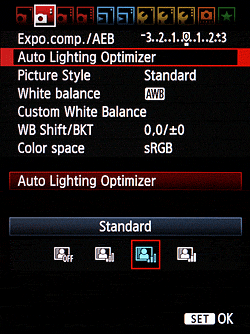
The Auto Lighting Optimizer function from the 50D has been retained unchanged for the Canon 60D. It allows the photographer to expose for the highlights, and then the camera adjusts the image to open up the shadows during image capture. On the Canon 60D, ALO has four settings, including Off, Low, Medium, or Strong.

Highlight Tone Priority
The Canon 60D also retains the 50D's Highlight Tone Priority function, which biases the dynamic range to retain more detail in the highlight areas -- important for wedding photographs, where white dresses typically have blown detail.

Noise Reduction

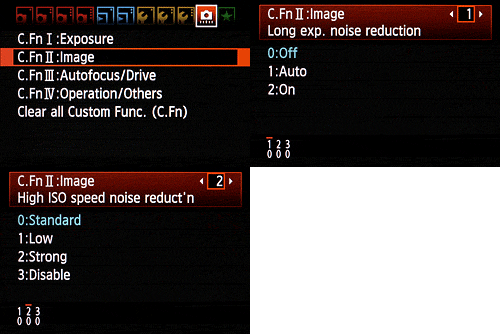
The Canon 60D offers two types of adjustable noise reduction. Long Exposure noise reduction can be performed for exposures one second or longer, and works by taking a second "dark frame" of equal duration with the shutter closed, and then subtracting it from the first frame. This reduces or eliminates most noise generated by the sensor during long exposures at low ISOs, but can make noise worse at higher ISOs (at ISO 1,600 and above). Available settings are Off, Auto and On. The 60D also offers the user four levels of high ISO sensitivity noise reduction. Options are Disable, Low, Standard, and Strong.

Creative effects

New for the Canon 60D are a series of Creative Filter functions, similar to those seen previously in the company's PowerShot compact camera models, and fairly common in digital SLRs from rival manufacturers. The Canon 60D's creative filters include Soft Focus, Grainy Black & White, Toy Camera effect (which has strong vignetting and some color shift), and Miniature Effect (which simulates shallow depth of field by applying a graduated blur near opposite edges of the image.) The strength of each effect is adjustable, as is the angle of the miniature effect. The Canon 60D also offers a selection of aspect ratio settings in-camera, allowing photographers to shoot their images with a specific print format in mind, avoiding the need to manually crop images in post-processing.

Dust reduction

The Canon 60D includes Canon's EOS Integrated Cleaning System, first introduced on the EOS Rebel XTi camera. The camera's Self-Cleaning Sensor Unit uses a piezoelectric element to shake dust particles off of the low-pass filter in front of the sensor. The dust is then trapped by an adhesive strip along the base, preventing it from causing further nuisance. Cleaning is engaged each time the camera is powered up or shut down, or manually through the "clean now" function. The second part of the cleaning system involves post processing with a compatible personal computer and the supplied Digital Photo Professional software. Via a menu option, the camera maps any stubborn dust spots that remain on the sensor after cleaning, saving their locations as Dust Delete Data that can subsequently be used to subtract the spots during post-processing. A third option includes a manual sensor cleaning function which raises the mirror and allows users to clean dust that may have stuck to the low-pass filter.

Connectivity

For transferring data to a computer or PictBridge-compatible printer, the Canon 60D includes a standard USB 2.0 High Speed connection. The Canon 60D can also be connected to high-definition displays via its mini HDMI output, which features Consumer Electronics Control (HDMI-CEC) compatibility, allowing certain playback functions to be controlled from the attached display's remote control. For photographers still using standard-definition equipment, the Canon 60D also includes a composite audio / video output connection, which is NTSC / PAL switchable. The standard-definition video cable is included in the product bundle, but the HDMI cable is not.

Other connectivity includes a 3.5mm external stereo microphone input, and a remote control port compatible with the optional wired Canon RS-60E3 Remote Switch. The Canon 60D is also compatible with the wireless RC-1, RC-5, and RC-6 infrared remote controllers.

Storage
The Canon 60D stores images on Secure Digital cards, including both Secure Digital High Capacity (SDHC), and the latest generation Secure Digital eXtended Capacity (SDXC) types. The Canon 60D is also compatible with Eye-Fi's WiFi-capable SD cards, and includes support for checking Eye-Fi card status on the 60D's LCD display.

Power
The Canon 60D uses the same LP-E6 battery pack that's used in the EOS 7D, but is incompatible with the battery packs previously used by the EOS 20D, 30D, 40D, and 50D. Canon says that the EOS 60D is capable of capturing up to 1,100 shots with flash usage, or 1,600 shots without flash. The Canon 60D also includes a built-in secondary battery, used to maintain the correct date and time when the main battery pack is removed or discharged. The secondary battery charges automatically when the removable battery is inserted, and when fully charged, can maintain the camera's clock for around three months. For long-term power, such as in studio shooting, the Canon 60D is compatible with the company's ACK-E6 AC Adapter Kit.

Accessories
The Canon 60D is compatible with the newly designed battery grip, which also provides duplicate controls for portrait shooting. Canon has also introduced a new E2 hand strap with the Canon 60D, addressing some users' concerns that neck straps can be restrictive, or simply get in the way, especially when you're using the Vari-angle LCD screen.

Canon 60D vs 50D Comparison

Canon 60D vs 50D Comparison

The Canon 60D is reduced in nearly all dimensions, except for the overall thickness. Width and height are smaller by one and two millimeters respectively, and the shoulders slope a bit more. An infrared sensor appears on the 60D grip, while it's long been absent from the 50D and its predecessors. Bravo.


The Canon 60D's left-mounted LCD hinge seems to be a clear reason that the overall control set has been reduced from the 50D, as there's no longer room for the buttons across the bottom of the LCD, nor is there room on the left.

The LCD is most changed from the 50D, as it's now tapered instead of rectangular. Front-to-back thickness is increased by five millimeters, while the pentaprism/flash size is noticeably smaller. Finally it's obvious from this angle how much smaller the grip is; that'll be good for some, not for others depending on your hand size.

Donderdag 25 April 2013

Canon 60D vs Nikon D7000 Comparison

Canon 60D vs Nikon D7000 Comparison

The Canon 60D is slightly larger than the Nikon D7000, mostly in width, but the Canon xxD line has shrunk somewhat to take on the D90 and D7000. The 60D even includes an infrared receiver, located on the grip, while the Nikon D7000's IR port appears on the upper right of the lens mount. A key advantage remains in the D7000, though, which is the AF-assist lamp. The two lenses address similar needs, with the Canon covering 28.8-216mm, and the Nikkor covering a slightly wider and shorter 27-157.5mm; both are f/3.5-5.6 and image-stabilized. The Canon 60D is also missing the equivalent of AF Fine-tuning, something the D7000 retains (an important feature if you have a lens that front or back-focuses).


The top view shows the smaller packing size of the Nikon D7000. Note the use of D-rings on the Nikon, which, while nostalgic, have the unfortunate tendency to rattle, noise that can be heard in videos made using the internal microphone. The Canon design mates metal with cloth, with no metal-to-metal contact that can rattle. The Canon 60D still leaves a few more controls on the top deck, while the Nikon D7000 has the power switch in a position where it's very easy to activate with your finger at the ready. The Canon 60D also has a locking mode dial.


The back of the Canon 60D shows what might be behind the wider body: it has an articulating LCD with a hinge, and the aspect ratio of the LCD is wider than the Nikon's. Which you prefer is quite individual. I find the D7000 grip small but extremely efficient, offering good room and bite for the fingertips and the thumb and heel of my hand to get excellent control very quickly. The Canon 60D's grip is a little more tacky with excellent texture, but though there is a slight ridge to help the fingertips grip better, it's not quite as sure a hold as the D7000's. There's still more room to spread your thumb over the 60D's back, though. That's an assessment for my hands, but your experiences will differ. Most of the 60D's controls are grouped on the right side of the camera, thanks to the hinge on the left of the LCD that enables it to swing out and help you capture images from a wide variety of angles. Both designs offer reasonably quick access to Movie mode. The 60D's hot shoe can be sealed from water when used with a 580EX II flash. Otherwise, both control arrangements are pretty good, if completely different.

Fujifilm FinePix F900EXR – Best Pocket Superzoom (20x zoom)

Fujifilm FinePix F900EXR – Best Pocket Superzoom (20x)

It’s been tough keeping up with all the new camera announcements so far this year. One that I passed over initially but deserves attention is the new Fujifilm FinePix F900EXR – their latest top-of-the-line pocket superzoom camera. It’s got a large 1/2-inch 16-megapixel EXR II sensor, a 20x 25-500mm zoom lens, RAW shooting and P,A,S,M manual shooting modes making it the pocket superzoom for serious photographers. No problem if you’re not a manual shooter – Fujifilm’s EXR Auto mode has got you covered. The 1/2-inch sensor is the largest of any pocket superzoom and now has embedded phase detect pixels, which Fujifilm claims give it the world’s fastest auto focus. The big sensor, manual controls and RAW shooting have actually been standard on this camera for a couple of generations now. What’s new with the F900EXR is more speed, better auto focus and improved built-in Wi-Fi.

Fujifilm FinePix F900EXR Key Features and Specification:

  •     16-megapixel 1/2-inch backlit EXR-CMOS II sensor
  •     New EXR Processor II
  •     Intelligent Hybrid AF system – embedded phase detect pixels
  •     CMOS-shift Image stabilization
  •     Improved built-in Wi-Fi
  •     20x 25-500mm f/3.5-5.3 (equiv.) optical zoom lens
  •     1920 x 1080 60 FPS full HD video with built-in stereo mic
  •     3-inch 920k-dot LCD display
  •     ISO 100 to 12,800
  •     PASM manual shooting modes
  •     Auto EXR mode
  •     Pop-up flash
  •     11 FPS full resolution burst
  •     RAW mode
  •     In-camera filters

Speed is one of the main improvements in the F900EXR, according to Fujfilm. It uses a new EXR Processor II, which they say has double the performance of the previous processor. Some of the benefits are a startup time of just 1.1 seconds, a shot to shot time of 0.5 seconds, and super-fast burst rate of 11 FPS at full resolution (5 shot limit). The improved processing also allowed them to increase the video frame rate to 60 FPS at 1920 x 1080 full HD, and that means better video quality and the ability to do full HD slow motion video clips. Better processing should also mean better image quality – especially in low light where in-camera noise control plays an important role.

Embedding phase detect pixels on the sensor is a big deal – especially for a compact camera like this. In fact, correct me if I’m wrong but I think the Fujifilm FinePix F900EXR is the first pocket camera to get this kind of technology. Traditionally, phase detect auto focus was something you only got with an SLR, since the phase detect AF array was on the mirror. Phase detect auto focus is much better for moving subjects, which is one reason why the vast majority of sports photographers use DSLRs. But no mirror = no phase detect auto focus. Until now, that is. Putting phase detect pixels on the sensor is the latest thing for improving auto focus performance. Mostly, it’s been done with mirrorless camera, though. I believe Fujifilm is the first company to try it on non-interchangeable lens cameras. In early January they announced the X100S and X20 high-end compact cameras, both of which had phase detect pixels embedded on the sensor. The Intelligent Hybrid AF system in the F900EXR analyzes the scene and automatically switches between phase detect and contrast detect AF to deliver the best auto focus performance for the situation. I haven’t used it so I don’t know how well it works but I’m definitely excited about the possibilities – especially for action photography and video. I’ll keep my expectations low but I like where the new technology is headed and I look forward to testing the F900EXR hybrid auto focus.

Built-in Wi-Fi used to be pretty much a novelty in cameras. However, in the last year it’s become a very useful feature. Cameras now create their own Wi-Fi network so you don’t need a wireless access point to use the wireless features; and camera manufacturers have begun making their own mobile apps to take better advantage of built-in Wi-Fi functionality. With the F900EXR’s built-in Wi-Fi and the “Fujifilm Camera Application” installed in your phone or tablet (iOS or Android) you can wirelessly transfer photos and videos from the camera to your mobile device and then easily share to Facebook, Instagram, Flickr, etc. There’s also a “Fujifilm PC AutoSave” app that allows you to save photos and videos to your computer without a USB connection or card reader.

Pocket superzooms are my favorite kind of point-and-shoot camera because they allow me to carry the equivalent of a whole bag of lenses in my pants pocket (pocket superzoom camera guide). You do give up a bit of image quality compared to premium compact cameras with larger sensors and faster lenses. But I’m happy to make that trade to get the versatility of a 20x zoom lens, and the F900EXR’s 1/2-inch sensor is the best available in a pocket superzoom camera right now. Add RAW shooting and manual exposure controls and this camera is a winner for me. I also like Fujifilm’s EXR modes, which take advantage of their unique “three-sensors-in-one” EXR sensor design so you can choose to shoot for resolution, dynamic range or low light. The Fujifilm FinePix F900EXR has just been moved to the top of the list for my next P&S camera. It’s about time I tried one and I think I’ve convinced myself that the right way to do that is to just buy one – stay tuned for more.

The Fujifilm FinePix F900EXR will be available March, 2013 for US $399.95. If you don’t care about the built Wi-Fi, there’s also a slower, non-Wi-Fi version called the F850EXR, which will sell for $100 less.

Best Digital Camera 2013 decided by Reviews

When it comes to choosing a camera there are so many different factors that need to be considered, the first is the type of camera you wish to go for, second is your budget, although the two pretty much go hand in hand. When looking for the best digital camera in 2013, which has been decided by their positive reviews, we can’t help notice that there are a few older models in the list. The reason for this is because some of them are still far better than many of the new models hitting the market.

So let us look at six of the best camera models, which we have broken down into 3 categories, DSLR, Superzoom and Compact.

Best DSLR cameras for 2013
First up we have the Canon EOS 6D, which we recently pitted against the 7D and Nikon D600. This is a full-frame camera that comes in a compact body, ideal for those who don’t wish to lug a beast around. PC Mag loves the fact that this is pretty cheap for its class and comes with some top-notch features, although this isn’t the fastest on the block and the GPS loves to drain the battery.

Tech Radar has given the Nikon D5100 four and a half out of five stars. They loved its high resolution and precise LCD display, the lack of control over the exposures can be a bit of a turn off. However, both novices and enthusiasts will love the D5100.

Best Superzoom cameras for 2013
The Panasonic Lumix DMC-FZ200 has been voted very highly by PC Mag, and while this is a 2012 camera it still has more to offer than some of the new models coming out now. While the DMC-FZ200 has a lack-luster zoom ratio, the speedy performance and sharp lens more than makes up for this downfall.

The Sony Cyber-shot DSC-HX30V is getting on a little now, but the excellent photo quality and fast performance proves that there is life in the old dog yet. However, it’s a little on the expensive side and can take some time to master the features. An in-depth review of this camera can be found by visiting CNET.

Best Compact cameras for 2013
The  Sony Cyber-shot DSC-RX100 has a huge sensor for such a compact camera, and you will be amazed at how close the images come to those taken with a more expensive DSLR. However, this is still a little pricey and does not have as much optical zoom as we would have hoped. PC Mag has a full review on this compact camera.

A review of the Sony Cyber-shot DSC-WX150 sees this compact score an impressive four out of five stars. This camera is said to be very fast and the 10x optical zoom is pretty good considering its size. However, it seems that the 18-megapixel lens is a bit of an overkill and because there is not much weight to the camera it can become a little tough to keep steady while taking a photo.